
Stop the Crackle: 5 Signs Your Tube Socket is Killing Your Amplifier’s Tone

tube socket

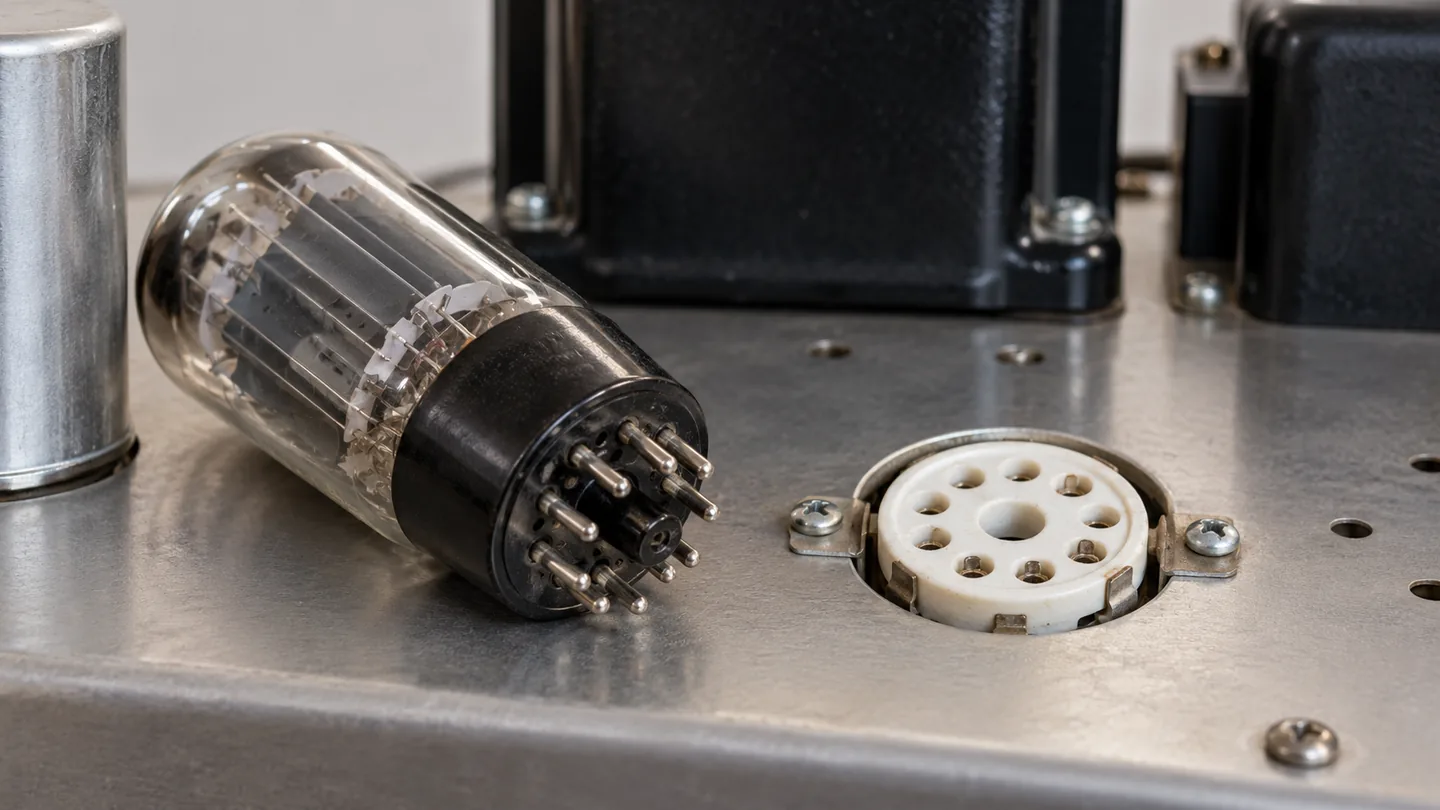
You’re mid-solo when it happens: a sudden crackle, a thinning of your gain, or a complete signal dropout. Your first instinct is to swap the vacuum tubes, but what if the glass isn’t the problem? Often, the true culprit is a failing tube socket—a hardware-level issue that many players overlook.

When your amplifier’s connection points suffer from oxidized pins or loose socket tension, even the most expensive boutique tubes will sound lackluster. To save your tone (and your wallet), you must look beyond the tube itself. In this guide, we provide the diagnostic tools you need to troubleshoot like a pro. We’ll show you how to safely perform the essential “chopstick test” to isolate mechanical noise and help you accurately differentiate between a dying vacuum tube and a faulty hardware connection. Stop guessing and start diagnosing; here are five signs your tube socket is killing your amplifier’s tone.

Is It the Tube or the Socket? Identifying the Source of Your Amp’s Noise

Distinguishing between a failing vacuum tube and a degraded socket is the most critical step in amplifier diagnostics. Because both can produce identical symptoms—pops, crackles, and intermittent signal dropouts—randomly “rolling” new tubes can lead to expensive frustration if the underlying issue is mechanical.

The most effective diagnostic tool in your arsenal is the Chopstick Test. While the amplifier is powered on and live (exercise extreme caution around high-voltage internal components), use a non-conductive wooden or plastic chopstick to gently probe the tube and its base. If tapping the glass creates a distinct, bell-like “tinkling” or a loud howl, the tube itself is likely microphonic. However, if the noise is triggered by gently wiggling the tube or applying side-pressure to the base, you are likely dealing with a socket issue. This signifies either poor pin tension—where the socket’s female connectors have lost their “spring” and no longer grip the tube pins—or oxidation buildup that has created a high-resistance barrier.

To confirm the diagnosis, perform a “swap test” with a known-good tube. If the crackling persists in the same physical position regardless of which tube is inserted, the socket’s integrity is compromised. Look for visual cues: dark, crusty oxidation on the contacts or “arcing” marks (black carbon tracks between pin holes). While a tube failure is an internal vacuum or filament issue, a socket failure is a physical breakdown in the signal path. Differentiating between the two ensures you aren’t treating a mechanical connection problem with a temporary tube replacement.

Sign 1: Audible Pops and the Mechanical “Chopstick Test”

Audible pops and sharp, intermittent crackling are often the first warnings that your amplifier’s signal path is being compromised at the physical interface. While a failing vacuum tube can certainly cause these artifacts, a faulty socket often betrays itself through mechanical sensitivity. If your amp emits a “bolt of lightning” sound whenever you nudge the chassis or even when the speaker’s low-end frequencies vibrate the cabinet, you aren’t dealing with a software glitch—you’re dealing with a mechanical failure.

To isolate the source, technicians utilize the “Chopstick Test.” This diagnostic involves using a non-conductive probe—traditionally a wooden or bamboo chopstick—to physically manipulate the tube and socket while the amplifier is powered on and at a low volume. Unlike your fingers, a wooden chopstick protects you from the lethal DC voltages present at the socket pins while allowing you to apply targeted pressure.

The goal is to differentiate between a microphonic tube and a loose socket. When you gently tap the glass envelope of the tube, a high-pitched, metallic “ping” or ringing indicates an internal tube failure (microphonics). However, if wiggling the tube at its base or applying lateral pressure to the socket causes a harsh, static-filled crackle or a sudden drop in volume, the culprit is the socket. This usually points to two specific issues: loss of pin tension or oxidation. Over years of thermal cycling, the metal “grips” inside the socket can lose their springiness, resulting in a “loose” connection that arcs and pops as current jumps the gap. If the chopstick reveals that the noise correlates with movement at the pin-to-terminal contact point, your socket’s grip has failed, and no amount of new tubes will steady your tone.

Sign 2: Visible Oxidation and Corrosion on the Pin Contacts

While audible pops provide an immediate red flag, some of the most insidious tone-killing issues are hidden in plain sight. Oxidation and corrosion act as a resistive barrier between your tube pins and the socket’s internal tensioning grips. When you pull a tube and see a dull, greyish-black film or a crusty green patina (verdigris) on the pins, you aren’t just looking at surface grime; you’re looking at a chemical layer that significantly increases electrical resistance.

The real danger, however, lies within the female “fingers” of the socket. Using a high-lumen flashlight, peer into the pin holes. The contacts should ideally have a bright, metallic luster. If they appear dark, charred, or matte, the socket has likely succumbed to years of thermal cycling and atmospheric moisture. This oxidation doesn’t just cause the occasional crackle; it acts as a parasitic filter, rolling off high-end clarity and making your amplifier sound “congested” or dynamically flat.

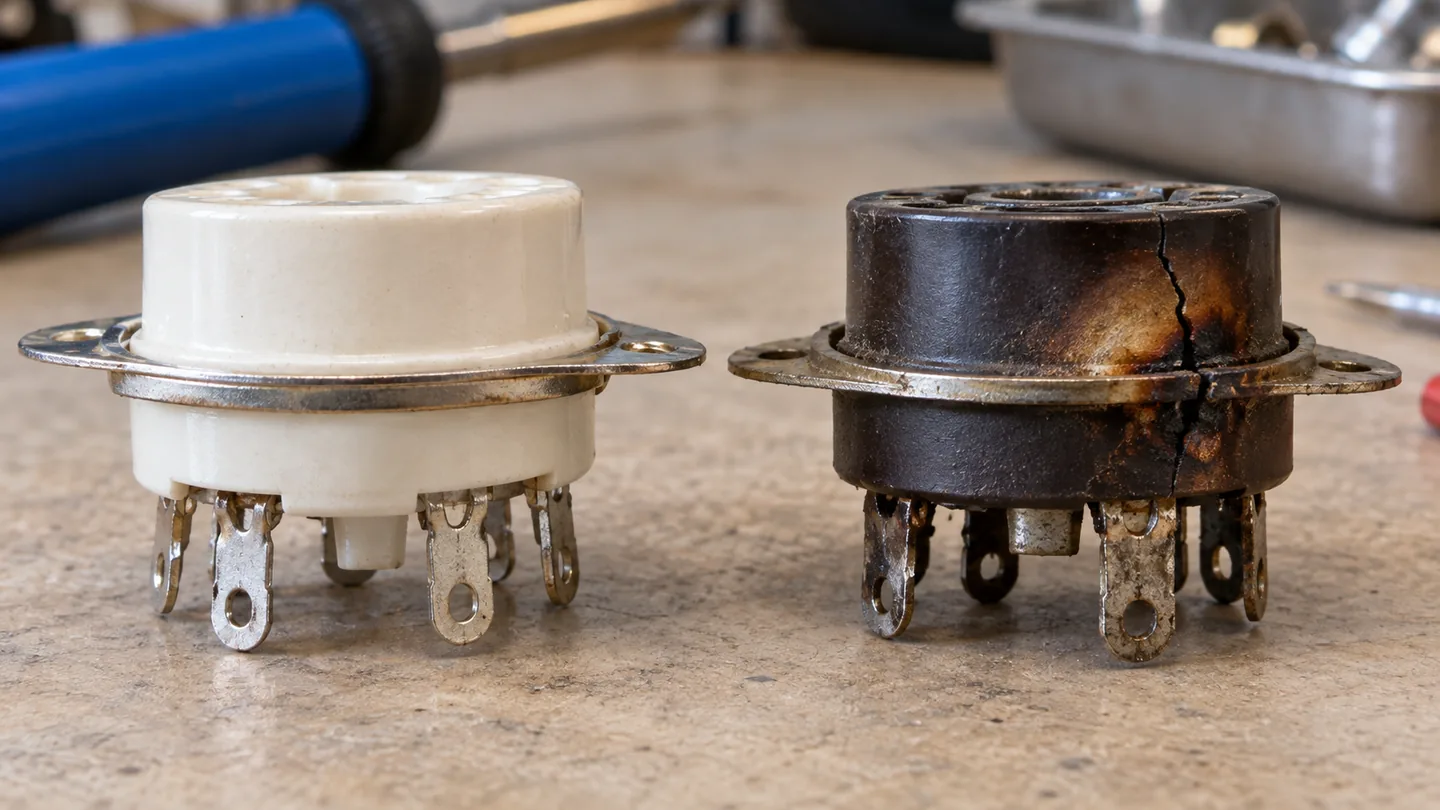
In high-voltage environments, you must also look for carbon tracking—thin, burnt lines etched into the ceramic or phenolic base between the pin holes. This is caused by arcing, where electricity jumps the gap between pins. Unlike simple oxidation, carbon tracking provides a permanent conductive path that can lead to catastrophic transformer failure. If you have cleaned your tube pins but the signal remains weak or “fuzzy,” the internal socket contacts have likely lost their plating. At this stage, the metal-to-metal interface is no longer capable of maintaining the low-impedance connection required for high-fidelity signal transfer. If the socket looks “crusty,” your tone will inevitably mirror that degradation.

Sign 3: Intermittent Signal Loss Caused by Weak Pin Tension

While oxidation is a chemical barrier, weak pin tension is a mechanical failure. Over years of thermal cycling—the constant expansion and contraction of metal as your amp heats up and cools down—the female grip connectors within the socket lose their spring temper. This “contact fatigue” is especially prevalent in vintage amplifiers or budget sockets made from inferior alloys that lack the resiliency of high-quality phosphor bronze.

The hallmark symptom of weak tension is an intermittent signal that seems to “cut out” randomly, often triggered by the low-end vibrations of your speaker cabinet or the physical movement of the amplifier. Unlike a failing vacuum tube, which typically exhibits a gradual loss of gain or a consistent internal hum, a socket with poor tension produces abrupt, binary signal loss.

To diagnose this, perform a variation of the chopstick test while the amp is live (taking extreme care to avoid high-voltage components). Rather than just tapping, gently nudge the tube laterally. If the audio signal “blinks” or crackles specifically when the tube is pushed to one side, the socket’s grip has failed. You can also test the “feel” when the amp is off and the capacitors are fully discharged. A healthy socket should offer significant mechanical resistance upon insertion; if the tube slides in effortlessly or feels “sloppy,” the tension is insufficient.

Note that loose tension creates high-resistance points that generate localized heat. Left unaddressed, this heat can further degrade the metal or even melt the socket housing, potentially leading to a catastrophic arc-over. This makes pin tension more than just a tonal issue—it is a critical safety concern for your output transformer.

Sign 4: Scorched Bases and Heat Damage on Ceramic or Bakelite Sockets

While vacuum tubes are designed to operate at high temperatures, the sockets that house them should never show signs of combustion or structural melting. Scorched bases are more than a cosmetic flaw; they indicate a dangerous breakdown in the socket’s dielectric strength. This issue is most prevalent in vintage amplifiers using Bakelite (phenolic) sockets, though it can also manifest in modern ceramic versions under extreme thermal stress.

The primary culprit here is “carbon tracking.” This occurs when a high-voltage arc—often triggered by a loose pin connection or a catastrophic tube failure—burns a microscopic path into the socket material. Because carbon is conductive, this scorched path creates a permanent bridge between high-voltage pins. In Bakelite sockets, this can lead to a runaway effect where the material itself begins to smolder, producing a distinct, acrid “burnt electronics” smell. If you notice black, web-like streaks or charred “rainbow” discoloration between the pin holes, the socket’s insulation has fundamentally failed.

On ceramic sockets, look for hairline fractures or localized dark spots, particularly around the heater or plate pins. While ceramic is more heat-resistant than Bakelite, extreme temperatures can cause the material to become brittle or cause the metal pin-clips to lose their “temper,” leading to a loss of tension. If your amplifier emits a sharp, ozone-like scent or you observe physical crumbling around the socket entry points, the hardware has reached its thermal limit. At this stage, the socket is no longer a passive insulator; it has become a parasitic resistor that actively saps your signal and threatens to short out your output transformer. Replacement is the only safe path forward.

Sign 5: Excessive Ground Hum and Shielding Connection Failures

While the previous signs dealt with mechanical interruptions to the signal path, Sign 5 is characterized by a relentless, low-frequency “drone” that persists regardless of your volume settings. Tube sockets serve a dual purpose: they provide electrical connectivity and act as a critical bridge to the amplifier’s chassis ground. When the mechanical bond between the socket and the chassis degrades, your amplifier loses its ability to drain electromagnetic interference (EMI).

On 9-pin miniature sockets (like those for 12AX7s), the center shield and the metal mounting flange are designed to dissipate noise. If the mounting screws have loosened over time or the metal has oxidized, the socket effectively becomes an antenna rather than a shield. This manifests as a 60-cycle hum that often intensifies when you move your hand near the tube. If you notice that wiggling a tube shield—or the tube itself—causes the hum to fluctuate or disappear, the socket’s grounding lugs are likely the culprit.

To diagnose this, perform a continuity check with a multimeter (ensuring the amplifier is unplugged and capacitors are safely discharged). Measure the resistance between the socket’s ground pin or mounting rim and a known good ground point on the chassis. Any reading above 0.5 ohms indicates a compromised connection. Often, this is caused by “cold” or cracked solder joints on the socket’s ground lugs, which can occur after years of thermal expansion and contraction. Unlike a failing tube, which might produce a “rushing” or “wind” noise, a socket-related grounding failure produces a steady, rhythmic hum that indicates your signal’s noise floor has been permanently raised by a hardware-level failure.

The Technical Difference Between a Failing Vacuum Tube and a Faulty Socket

Distinguishing between a failing vacuum tube and a faulty socket requires understanding that the tube is a consumable electronic component, while the socket is a structural mechanical interface. When a tube nears the end of its life, the failure is typically internal and chemical. Depleted cathode emission or a loss of transconductance results in a gradual “darkening” of the tone, a loss of headroom, or a drifting bias. These symptoms are consistent and usually independent of physical vibration.

In contrast, a socket failure is defined by a breakdown in the signal path’s integrity. While a failing tube might exhibit a soft hiss or a steady hum due to internal leakage, a faulty socket produces erratic, non-linear noise. This is often caused by high-resistance junctions—microscopic gaps between the tube pin and the socket clip where oxidation or “carbon tracking” has occurred. From a technical standpoint, if the issue is a “gassy” tube or a shorted internal grid, the noise will persist regardless of how the tube is seated. If the issue is the socket, the noise will react violently to mechanical stress.

The definitive diagnostic difference lies in thermal expansion and contact tension. A failing tube often behaves predictably as it reaches operating temperature. However, a faulty socket often fails intermittently as the metal clips expand with heat, losing their “spring” and causing the connection to fail only after the amp has been running for thirty minutes. If swapping in a known-good tube doesn’t eliminate the crackle, the fault lies in the interface. Essentially, a bad tube is a failure of the vacuum; a bad socket is a failure of the bridge connecting that vacuum to the circuit.

Step-by-Step Guide to Safely Cleaning Your Tube Sockets

Before reaching for the contact cleaner, you must respect the lethal voltages stored within an amplifier’s filter capacitors, even when the unit is unplugged. Ensure the chassis is safely discharged before proceeding. To achieve a professional-grade clean that lasts, avoid generic lubricants; instead, utilize a dedicated deoxidizing solution like Caig DeoxIT D5 or G5.

The most effective cleaning method involves a combination of chemical action and mechanical agitation. Rather than spraying the solvent directly into the socket—which can lead to messy residue buildup on the chassis or dielectric breakdown—apply a small amount of cleaner to the pins of a vacuum tube or a specialized interdental brush. Insert and remove the tube or brush into the socket 10 to 20 times. This “cycling” action scrubs the internal contact surfaces, stripping away the microscopic layers of oxidation that cause intermittent signal loss and crackling.

For sockets showing heavy green or black corrosion, use a non-conductive micro-applicator to gently scrub the internal tensioning clips. While the socket is empty, this is also the ideal time to check for “mechanical memory” issues. If the tube pins feel loose during the cleaning process, use a small dental pick or a precision flathead to carefully nudge the internal clips back toward the center to restore proper tension. Finally, allow at least 20 minutes for the solvent to fully evaporate. Rushing this step can lead to arcing across the socket base, potentially damaging both the tube and the transformer. A systematic, dry-contact approach ensures a low-resistance signal path and eliminates the “phantom” noises that plague neglected vintage hardware.

How to Retension Loose Socket Clips for a Solid Connection

After cleaning away oxidation, the most critical factor for signal integrity is mechanical tension. Over years of thermal cycling—where the metal expands when hot and contracts when cool—the internal spring clips of a tube socket can lose their “memory,” resulting in a loose grip on the tube pins. This lack of contact pressure creates micro-arcing, increased resistance, and intermittent signal drops.

Before proceeding, safety is paramount: ensure the amplifier is unplugged and the filter capacitors are fully discharged. You are working directly on the high-voltage rail, and even an unplugged amp can hold a lethal charge.

To retension the clips, use a fine-pointed tool such as a dental pick or a precision jeweler’s flat-head screwdriver. Looking down into the socket from the top of the chassis, locate the individual metal contacts inside each pin hole. Gently insert your tool into the gap between the outer wall of the socket and the metal “fingers,” then nudge the contact toward the center of the hole. The goal is to slightly narrow the opening so it exerts more lateral pressure on the tube pin. Work your way around the socket symmetrically, applying uniform pressure to each contact point.

Test your progress by inserting a known-good tube. You should feel a distinct “bite” or firm resistance as the pins seat into the socket. If the tube slides in effortlessly or wobbles, the tension is still insufficient. However, exercise caution: over-tensioning can make the clips brittle or, in extreme cases, crack the glass base of your vacuum tubes. If the metal clips feel “mushy” or fail to spring back after adjustment, the tempering of the metal has likely been compromised by excessive heat, and a full socket replacement is the only reliable fix.

When to Stop Cleaning and Perform a Full Tube Socket Replacement

While regular maintenance like DeoxIT application and manual retensioning can extend a socket’s lifespan, there comes a point where “nursing” a failing component becomes a liability to your transformer and your tone. The most definitive indicator that you’ve moved beyond simple cleaning is the presence of carbon tracking. If you observe thin, charred lines etched into the surface between pin holes—often the result of a high-voltage arc—the insulating properties of the socket are permanently compromised. Because carbon is conductive, these tracks create a parasitic path for current, leading to intermittent “lightning” pops or a catastrophic short that can destroy your output transformer.

Another red flag is irreversible metal fatigue. If you have retensioned your socket clips only to find the “grip” failing again within a few months, the metal alloy has lost its spring temper. Like a paperclip bent too many times, the clips can no longer provide the high-pressure interface required for a low-resistance connection. Similarly, if the socket base—whether ceramic, Micalex, or Bakelite—shows hairline fractures or “chalking” from decades of thermal cycling, its structural integrity is gone. Wobbly pins in a brittle base cause microphonic handling noise that no cleaner can suppress.

Finally, consider the internal oxidation factor. If corrosion has migrated into the rivets or the underside of the solder lugs where your cleaning brush cannot reach, the socket will remain a source of thermal noise and signal degradation. When you weigh the sub-$10 cost of a high-quality Belton or gold-plated ceramic socket against the value of your vintage glass and transformers, replacement is the only logical path. If the “crackle” returns shortly after a deep clean, stop troubleshooting and commit to the soldering iron; your amplifier’s signal-to-noise ratio will thank you.

Maintenance Tips to Prevent Future Tone Degradation and Socket Wear

Maintaining the integrity of your tube sockets is a proactive defense against the “tone suck” and mechanical noise that plagues aging amplifiers. To prevent future degradation, establish a biannual inspection routine focused on thermal management and contact cleanliness. Oxidation is the primary enemy; however, over-cleaning can be just as damaging. Avoid abrasive materials that strip away the protective plating on socket clips. Instead, use a high-quality, residue-free contact cleaner like DeoxIT D5 sparingly. A single drop on a tube pin, inserted and withdrawn several times, is often sufficient to sweep away micro-corrosion without leaving a sticky film that attracts dust and carbon.

Furthermore, be mindful of “tube rolling.” While experimenting with different vacuum tubes is a hallmark of the hobby, frequent insertion and extraction cycles are the leading cause of weakened pin tension and mechanical fatigue. When swapping tubes, avoid excessive lateral rocking, which widens the grip of the female connectors. If your amplifier is a high-gain or vintage model, consider using tube dampers to minimize microphonic vibrations that can lead to “fretting corrosion”—a process where microscopic movements wear down the contact surfaces over time.

Finally, control your environment. High humidity accelerates chemical reactions between dissimilar metals in the socket. If you store your amp in a basement or humid studio, use a dehumidifier or keep the amp in a flight case with silica gel packets. By minimizing mechanical stress and chemical exposure, you ensure that your signal path remains transparent and your noise floor stays as low as the day the amplifier left the factory.


Have questions or your own tips to share? Drop a comment below!

Leave a Comment

Your email address will not be published. Required fields are marked *

Scroll to Top